Introduction
Artificial Intelligence is no longer just about asking a chatbot questions.
In 2026, AI tools are becoming specialized productivity partners that can help us research faster, analyze data, create visual content, build AI-powered applications, and even reduce the amount of typing we do every day.
For developers, creators, analysts, entrepreneurs, students, and technology professionals, this represents an important shift.
Productivity is no longer only about how fast you can work.
It is increasingly about how effectively you can combine your knowledge and experience with the right AI tools.
But there is also a problem.
Hundreds of AI tools are available today, and new ones appear constantly. Trying every new AI platform can actually reduce productivity instead of improving it.
So instead of giving you another huge list of AI applications, this guide focuses on five AI tools that solve five different productivity problems.
In this article, we'll explore:
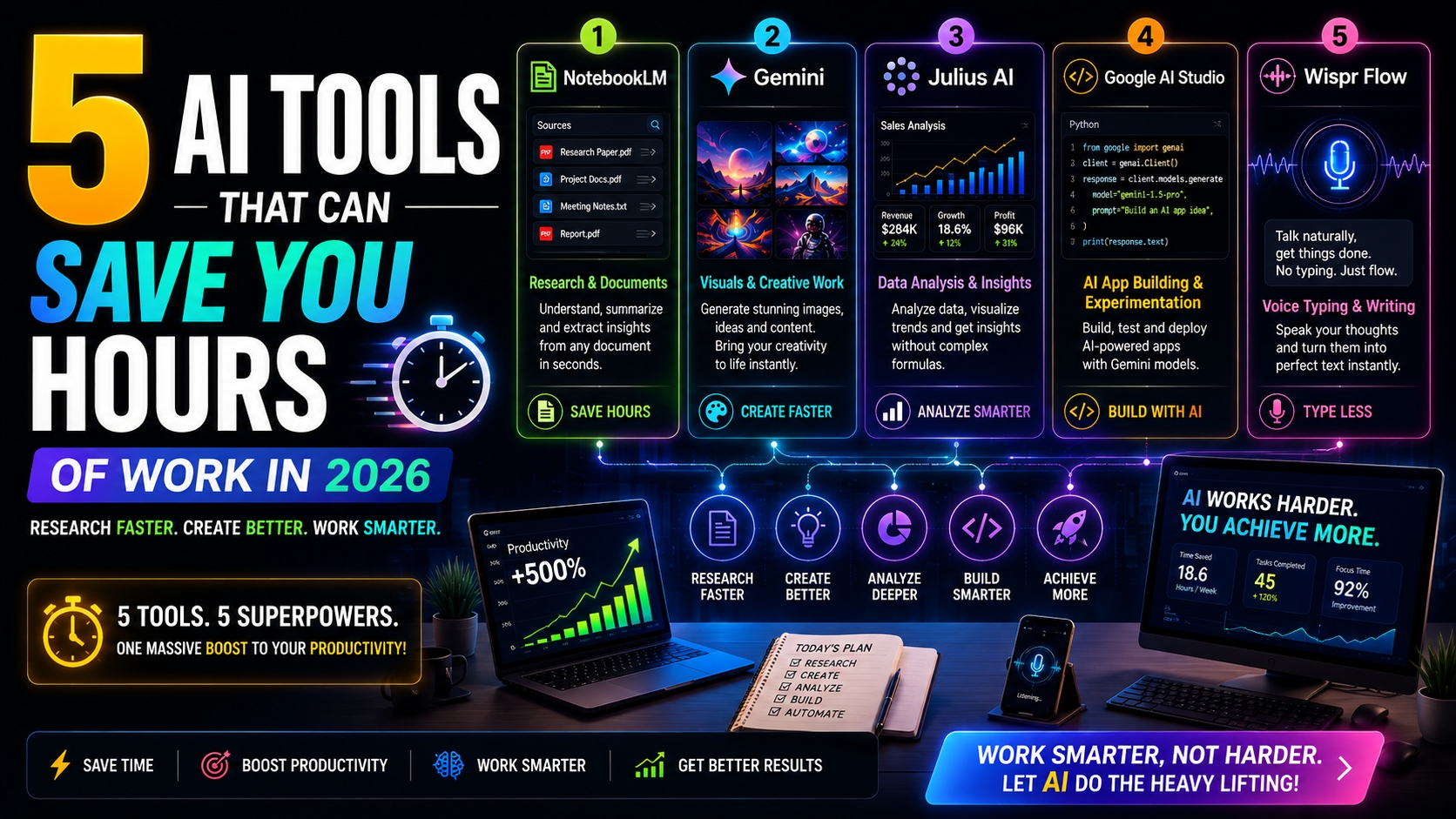
NotebookLM — Research & Documents
Gemini — Visuals & Creative Work
Julius AI — Data Analysis & Insights
Google AI Studio — AI App Building & Experimentation
Wispr Flow — Voice Typing & Writing
Let's understand what each tool does, where it can save time, and when you should actually use it.
1. NotebookLM — Research & Documents
One of the biggest productivity problems today isn't finding information.
It's understanding information quickly.
Imagine having:
Multiple PDFs
Technical documentation
Meeting notes
Research papers
Business reports
Training material
Project documents
Traditionally, you might open each document separately, search manually, take notes, and then try to connect all the information.
NotebookLM can make this process much more efficient.
It allows you to work with your own source material and use AI to explore, summarize, compare, and understand that information.
Where NotebookLM Can Save Time
NotebookLM can be particularly useful for:
Technical research
Studying documentation
Understanding reports
Preparing presentations
Comparing multiple documents
Learning complex topics
Organizing project knowledge
Summarizing research material
Practical Example
Imagine you're learning Data Engineering and have documents covering:
ETL vs ELT
Data Lakes
Data Warehouses
Apache Spark
Databricks
AWS data services
Instead of studying every document independently, you can organize the relevant material and use NotebookLM to help identify relationships between the concepts.
You can ask questions, explore the source material, and gradually build a structured understanding of the topic.
VirtualTechVibes Take
Use NotebookLM when your biggest problem is information overload.
Its real value isn't simply generating text.
It helps you work more efficiently with a defined collection of source material.
2. Gemini — Visuals & Creative Work
Modern professionals increasingly need visual content.
Developers need architecture illustrations.
Marketers need campaign graphics.
Bloggers need hero images.
Creators need social media visuals.
Businesses need presentations.
Creating every visual manually can consume significant time.
Gemini can assist with creative ideation and multimodal workflows, helping transform natural-language instructions into useful creative outputs.
Where Gemini Can Help
Gemini can assist with:
Visual ideation
Creative brainstorming
Image concepts
Content creation
Presentation ideas
Marketing concepts
Understanding images
Refining creative directions
Instead of starting with an empty canvas, you can start with an idea and use AI to explore different creative directions.
Example Prompt
Create a futuristic city at sunset with intelligent transportation systems, sustainable architecture, autonomous vehicles, reflective glass towers, cinematic lighting, and a premium technology editorial aesthetic.
Compare this with:
Create a futuristic city.
The first prompt provides much more creative direction.
That's why prompt engineering is becoming an important skill for AI-powered creative work.
VirtualTechVibes Take
Don't use AI visuals only because they're fast.
Use AI to accelerate ideation while applying your own creativity, branding, visual judgment, and purpose.
Speed without creative direction often produces generic content.
3. Julius AI — Data Analysis & Insights
Data analysis can be intimidating.
You may have thousands of rows containing:
Sales
Revenue
Customers
Transactions
Marketing performance
Product metrics
Operational data
Somewhere inside that dataset is the information you need.
Traditionally, extracting those insights might require spreadsheet formulas, SQL, Python, or Business Intelligence tools.
AI-powered data analysis tools such as Julius AI can make parts of this process more conversational.
Instead of starting with code, you can begin with a business question.
For example:
Which five products generated the highest revenue?
Or:
Compare monthly revenue growth and identify unusual declines.
Or:
Visualize sales performance by region.
Where Julius AI Can Save Time
Julius AI can be useful for:
Exploring CSV files
Finding patterns in data
Creating charts
Summarizing datasets
Asking natural-language questions
Performing exploratory analysis
Understanding trends
Generating initial insights
Does This Mean You Don't Need SQL or Python?
No.
AI can accelerate analysis, but humans still need to determine whether the analysis actually makes sense.
Understanding SQL, statistics, Python, data modeling, and business context remains extremely valuable.
This becomes even more important when data is being used to make business decisions.
VirtualTechVibes Take
AI can accelerate analysis. It cannot replace analytical judgment.
Always validate important calculations, trends, and conclusions before using them for critical decisions.
4. Google AI Studio — AI App Building & Experimentation
Using AI is one thing.
Building software with AI capabilities is another.
This is where Google AI Studio becomes particularly interesting for developers.
Google AI Studio provides an environment for experimenting with Gemini models, prompts, multimodal inputs, structured outputs, and application-oriented AI workflows.
Instead of only asking:
How can AI answer this question?
Developers can begin thinking:
How can I integrate this AI capability into my application?
That is a major shift.
You move from being an AI user to becoming an AI builder.
What Can Developers Explore?
Developers can experiment with ideas around:
AI assistants
Content generation
Document processing
Multimodal applications
Structured responses
AI prototypes
API-powered features
Intelligent application workflows
Practical Example
Imagine you're building a SaaS application.
You want users to ask questions about information stored inside the application.
A simplified workflow could look like this:
User Question
↓
Application
↓
Relevant Context
↓
AI Model
↓
Structured Response
↓
Application UI
Now AI isn't simply a separate chatbot.
It becomes part of your product architecture.
Why Developers Should Learn This
The next generation of applications will increasingly include intelligent capabilities.
That doesn't mean every application needs an AI chatbot.
It means developers should understand how:
AI models
APIs
Context
Data
Security
Validation
User experience
work together.
VirtualTechVibes Take
Using AI makes you an AI user.
Integrating AI into real products starts turning you into an AI builder.
For developers, this is one of the most important transitions happening in software development.
5. Wispr Flow — Voice Typing & Writing
Now consider a completely different productivity problem.
Typing.
Think about how much of your day involves writing:
Emails
Documentation
Messages
Prompts
Ideas
Meeting notes
Requirements
Technical specifications
Articles
For many people, explaining an idea verbally is significantly faster than typing it.
Voice-first AI tools such as Wispr Flow aim to reduce this friction by turning natural speech into polished written input.
Where Voice Input Becomes Powerful
Imagine you're thinking through a new software feature.
Instead of typing a long specification, you explain it naturally:
We need a dashboard where users can upload a CSV file, view basic analytics, ask questions about their data, generate charts, and maintain their previous analysis history.
You can capture that idea quickly through voice.
AI can then help transform it into:
Requirements
User stories
Development tasks
Technical documentation
Prompts
Project plans
This creates an interesting productivity workflow:
Think → Speak → Structure → Build
VirtualTechVibes Take
Voice AI isn't simply about dictation.
Its bigger opportunity is reducing the friction between thinking and creating.
The Real Power: Combine AI Tools Into a Workflow
The most interesting part isn't using these five tools independently.
It's combining them into a productive workflow.
Imagine you're planning a new AI-powered product.
Step 1 — Research
Use NotebookLM to understand documentation, reports, and source material.
Step 2 — Create
Use Gemini to explore ideas, visuals, and creative directions.
Step 3 — Analyze
Use Julius AI to understand relevant datasets and identify useful insights.
Step 4 — Build
Use Google AI Studio to experiment with AI functionality and application ideas.
Step 5 — Work Faster
Use Wispr Flow to capture prompts, requirements, documentation, messages, and ideas through voice.
Now AI isn't simply one tool.
It becomes part of your complete workflow.
5 AI Tools at a Glance
| AI Tool | Best For | Primary Benefit |
|---|---|---|
| NotebookLM | Research & Documents | Understand information faster |
| Gemini | Visuals & Creative Work | Accelerate creative workflows |
| Julius AI | Data Analysis | Explore data conversationally |
| Google AI Studio | AI Development | Experiment and build with AI |
| Wispr Flow | Voice Productivity | Reduce typing and capture ideas faster |
Which AI Tool Should You Choose?
You don't necessarily need all five tools.
Start by identifying your biggest productivity bottleneck.
Too many documents to understand?
Try NotebookLM.
Need help with creative or visual work?
Explore Gemini.
Spending too much time analyzing datasets?
Explore Julius AI.
Want to build AI-powered applications?
Start experimenting with Google AI Studio.
Spending too much time typing?
A voice-first workflow such as Wispr Flow may help.
The right AI tool is the one that solves a real problem in your workflow.
Don't Become an AI Tool Collector
There is a growing productivity trap in the AI era.
People spend hours:
Watching AI tool videos
Creating new accounts
Testing new platforms
Comparing features
Switching workflows
Following every new AI launch
But they aren't necessarily producing more meaningful work.
The goal should never be:
Use more AI tools.
The goal should be:
Produce better outcomes with less unnecessary effort.
If one AI tool genuinely saves you two hours every week, that tool may be more valuable than twenty AI applications you rarely use.
AI Doesn't Remove the Need for Skills
AI can make you faster.
But speed and expertise are not the same thing.
Human judgment remains essential for:
Accuracy
Security
Software architecture
Strategy
Creativity
Business context
Ethics
Decision-making
Quality control
The strongest professionals won't blindly delegate everything to AI.
They'll understand:
What should be automated?
What should be accelerated?
And what still requires human expertise?
How to Build Your Own AI Productivity Stack
Instead of subscribing to dozens of AI tools, start small.
Choose one tool for each major area of your workflow.
For example:
Research → NotebookLM
Creative Work → Gemini
Data → Julius AI
AI Development → Google AI Studio
Voice Productivity → Wispr Flow
Use these tools consistently.
Measure whether they actually save time.
Keep the tools that improve your workflow.
Remove the ones that don't.
Your AI stack should become simpler over time—not more complicated.
The Future of AI Productivity
The next stage of AI productivity won't simply be about better chatbots.
We're moving toward:
AI Agents
Intelligent workflows
Multimodal AI
Voice-first interfaces
AI-powered analytics
Automated research
AI-assisted software development
Connected business automation
Instead of opening an AI application every time we need assistance, AI will increasingly become embedded directly into our existing workflows.
For developers and technology professionals, understanding this shift will become increasingly important.
Final Thoughts
AI productivity isn't about working less seriously.
It's about removing unnecessary friction from work.
NotebookLM can help you navigate information.
Gemini can accelerate creative workflows.
Julius AI can make data exploration more accessible.
Google AI Studio can help transform AI ideas into application experiments.
Wispr Flow can reduce the friction of typing.
Individually, these tools can be useful.
Combined with your own skills, experience, and judgment, they become much more powerful.
The question for 2026 isn't:
"Which AI tool should replace my work?"
A better question is:
"Which part of my workflow should AI make dramatically better?"
Start there.
Key Takeaways
Don't adopt AI tools simply because they're trending.
Match each AI tool to a specific productivity problem.
Use NotebookLM for research and document-heavy workflows.
Explore Gemini for creative and multimodal work.
Use Julius AI to accelerate exploratory data analysis.
Explore Google AI Studio when you want to build with AI models.
Consider Wispr Flow for voice-first productivity.
Validate important AI-generated outputs.
Don't sacrifice fundamentals for automation.
Your expertise remains more important than the tool.
Frequently Asked Questions
What are the best AI productivity tools in 2026?
There isn't one universal best AI tool. The right choice depends on your workflow. NotebookLM is useful for research, Gemini for creative work, Julius AI for data exploration, Google AI Studio for AI development experiments, and Wispr Flow for voice-driven productivity.
Can AI tools really save hours of work?
Yes, especially when applied to repetitive or time-consuming tasks. However, the actual time saved depends on your workflow and how effectively you use the tool.
Do developers need all five AI tools?
No. Developers should choose AI tools based on specific problems rather than creating an unnecessarily large technology stack.
Will AI productivity tools replace professional skills?
No. AI can automate and accelerate parts of a workflow, but professional expertise remains essential for validation, architecture, security, creativity, and decision-making.
Which AI tool should beginners start with?
Start with the problem you want to solve. If you work heavily with documents, explore NotebookLM. If you're interested in AI development, explore Google AI Studio. For creative workflows, Gemini can be a useful starting point.
Continue Learning
If you're exploring AI-powered productivity, continue with these VirtualTechVibes guides:
15 Best AI Tools Every Developer Should Use in 2026
Prompt Engineering for Developers: The Complete Beginner's Guide
How to Build Anything with AI: A Complete Beginner's Guide (2026)
How to Build a Website with AI: A Complete Step-by-Step Guide (2026)
About VirtualTechVibes
VirtualTechVibes is a technology publication focused on Artificial Intelligence, Software Development, SaaS Engineering, Cloud Computing, Data Engineering, Automation, DevOps, Cybersecurity, and emerging technologies.
Our goal is to simplify complex technologies through practical, experience-driven content that helps developers, creators, founders, and technology professionals learn smarter and build better.
Learn Smarter. Build Better. Keep Evolving.