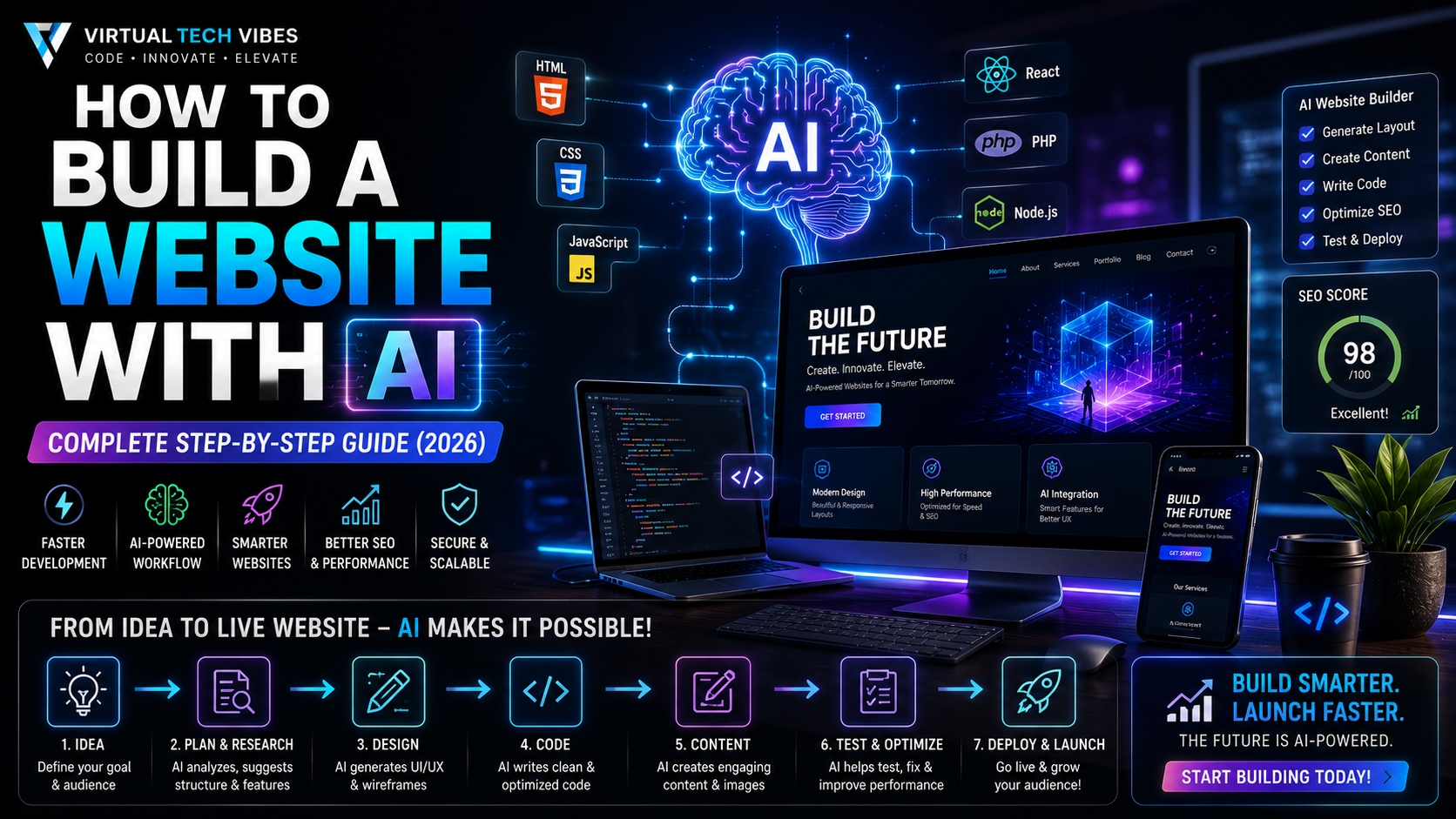
Introduction
Building a professional website no longer requires months of coding or a large development team. Thanks to Artificial Intelligence, anyone—from entrepreneurs and freelancers to developers and business owners—can create modern, responsive, and feature-rich websites in a fraction of the time.
AI doesn't replace web developers; it accelerates the entire development process by helping with planning, design, coding, testing, SEO, content creation, and deployment.
In this guide, you'll learn how to build a website with AI from scratch, the best tools to use, and a proven workflow that combines AI with human creativity.
Why Build Websites with AI?
Traditional website development often involves multiple specialists, including UI/UX designers, frontend developers, backend developers, content writers, and SEO experts.
AI simplifies many of these tasks by acting as a collaborative assistant.
Benefits of AI-Powered Website Development
Faster development cycles
Reduced development costs
Professional UI suggestions
AI-generated code
Automated content creation
Better SEO optimization
Faster debugging
Improved productivity
The result is a shorter path from idea to launch.
What Can AI Help You Build?
Modern AI tools can assist with almost every type of website, including:
Business websites
Personal portfolios
Blogs
SaaS platforms
E-commerce stores
Landing pages
Educational websites
News portals
Company websites
AI-powered applications
Step 1: Define Your Website Goal
Before opening any AI tool, answer these questions:
Who is your target audience?
What problem does your website solve?
What actions should visitors take?
What pages are required?
What features do you need?
For example:
Build a modern software company website with Home, About, Services, Portfolio, Blog, Contact, responsive design, dark theme, SEO optimization, and a lead generation contact form.
The more specific your prompt, the better the AI output.
Step 2: Research Your Competitors
Ask AI to analyse competing websites and identify:
Design trends
Navigation patterns
Common features
User experience improvements
SEO opportunities
Research first. Build second.
Step 3: Plan Your Website Structure
Create a sitemap before writing code.
Example:
Home
About
Services
Portfolio
Blog
Pricing
FAQ
Contact
AI can also generate user flows and navigation structures.
Step 4: Generate the UI Design
Use AI to create:
Wireframes
Colour palettes
Typography
Hero sections
Cards
Dashboards
Landing pages
Mobile layouts
Good design improves user engagement and conversion.
Step 5: Generate Website Content
AI can help write:
Headlines
Service descriptions
About pages
Blog articles
FAQs
Call-to-action sections
Meta titles
Meta descriptions
Always review and personalise the content to reflect your brand voice.
Step 6: Generate the Code
Depending on your technology stack, AI can generate:
HTML
CSS
JavaScript
React
Next.js
Vue
Angular
PHP
Laravel
Yii2
Node.js APIs
Python backends
Treat AI-generated code as a starting point. Review, test, and optimise it before deploying.
Step 7: Add AI Features
Enhance your website with modern capabilities such as:
AI chatbots
Smart search
Recommendation engines
Content summarisation
Image generation
Voice assistants
Automated customer support
These features can significantly improve user experience.
Step 8: Optimise for SEO
Before launching, ensure your website includes:
Optimised page titles
Meta descriptions
Clean URL structure
Image alt text
Internal linking
Fast loading speed
Mobile responsiveness
Structured data
XML sitemap
SEO should be part of the build process—not an afterthought.
Step 9: Test Everything
AI can help create test cases, but you should also manually verify:
Responsive layouts
Navigation
Forms
Performance
Accessibility
Browser compatibility
Security
Broken links
A polished website builds trust with visitors.
Step 10: Deploy Your Website
Popular hosting options include:
AWS
Azure
Google Cloud
Hostinger
Vercel
Netlify
DigitalOcean
Choose a platform based on your project's scale and requirements.
Best AI Tools for Website Development
| Purpose | Recommended Tools |
|---|---|
| Planning | ChatGPT, Claude |
| Research | Perplexity |
| UI Design | Figma AI |
| Coding | GitHub Copilot, Cursor |
| Image Creation | ChatGPT Image Generation |
| Testing | Playwright |
| Deployment | GitHub Actions, Vercel |
Remember, the best workflow often combines multiple AI tools rather than relying on a single platform.
Common Mistakes to Avoid
Starting without a clear plan
Blindly trusting AI-generated code
Ignoring responsive design
Skipping SEO basics
Using generic AI-generated content
Forgetting website security
Launching without testing
Best Practices
Begin with a clear vision.
Write detailed prompts.
Review every AI suggestion.
Keep user experience at the centre of every decision.
Optimise performance from day one.
Continue improving after launch.
The Future of AI Website Development
AI is making website development faster, smarter, and more accessible. Developers are evolving from writing every line of code manually to guiding intelligent systems that accelerate design, coding, testing, and deployment.
The future belongs to builders who know how to combine AI with engineering expertise—not those who rely on AI blindly.
Conclusion
Building a website with AI is no longer a futuristic concept—it's today's reality.
Whether you're creating a personal portfolio, a company website, or a large SaaS platform, AI can dramatically reduce development time while improving quality and productivity.
The most successful websites won't be built by AI alone. They'll be built by people who understand their users, define clear goals, and use AI as a powerful creative and technical partner.
Key Takeaways
AI accelerates every stage of website development.
Planning is more important than prompting.
Combine multiple AI tools for the best results.
Always review, test, and optimise AI-generated work.
Focus on user experience, performance, and SEO from the beginning.
Frequently Asked Questions
Can beginners build a website with AI?
Yes. AI tools make it easier for beginners to create professional websites with minimal technical knowledge.
Do I still need coding skills?
Coding knowledge is beneficial, especially for custom functionality, but many AI tools can generate a solid foundation that you can refine.
Which AI tool is best for website development?
There isn't a single "best" tool. ChatGPT, Claude, Cursor, GitHub Copilot, Figma AI, and Perplexity each excel at different parts of the workflow.
Is AI replacing web developers?
No. AI is increasing developer productivity by automating repetitive tasks while leaving architecture, problem-solving, creativity, and decision-making to humans.
About VirtualTechVibes
VirtualTechVibes is a global technology publication dedicated to helping developers, founders, creators, and IT professionals master Artificial Intelligence, Software Development, Cloud Computing, SaaS Engineering, Cybersecurity, DevOps, and emerging technologies through practical, experience-driven content.